
Need a Fresh Start for Your Internet Business? Grab My FREE Report!

My New Facebook Like Toolbar – What It Is and How You Can Get One
Keller Hawthorne | August 13, 2009 | Comments
Sphinn
My New Facebook Like Toolbar – What It Is and How You Can Get One

I’ll be honest with you – I’m a COMPLETE SUCKER for new plugins, widgets, code, scripts and anything else I can get to jazz up a website. I’ve installed a ton of plugins on my blog to try them out. I remove the majority of them in order to save on loading time and to prevent my visitors from getting overwhelmed. But, some are just too cool to let go.

Unfortunately, I can’t seem to remember the website I was visiting that led me to my new found treasure – if I remember, I’ll update this post. Anyways, I saw this Facebook like toolbar at the bottom of a website. It was just so cool. I clicked some of the buttons and quickly realized I couldn’t live without it! So, I clicked the little logo icon on the toolbar and got whisked away to Wibiya.com.

I had considered looking for something like this in the past, but I never got around to searching. Suddenly there one was – a Facebook like toolbar for blogs – I found one! But, I always try to do a little window shopping for applications before committing. So, I headed over to Google as fast I could (I wanted to install the toolbar immediately!!!).

I did a quick search for “Facebook like toolbar for website” and found one for Drupal. But, nothing else on the first page of results caught my attention. Like I said, I did a QUICK search. If you happen to know of other toolbars, please leave me a comment below.

I clicked back over to Wibiya.com and began soaking in all the info and cool features…

What Is The Toolbar?

I like to think of it as my “FresheVenture.com Visitor Dashboard.” The toolbar is a social network application topped off with a couple handy navigation tools. It essentially offers my visitors quick access to, well, ME!

Whether you want to connect with me, meet other visitors, share one – or all :) – of my posts, or find recent topics on my blog, the toolbar provides you with an easy gateway solution!

Features:

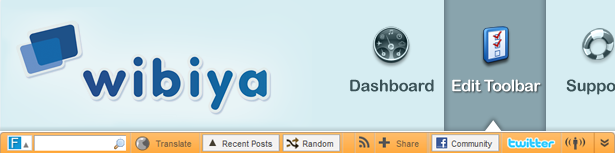
Facebook Fan Page: Show off your fans, display your latest fan page updates and offer your visitors an easy way to become a fan!

Facebook Community: Build your own community with Facebook connect. Visitors can join, post comments and see which of their friends have joined! They can also easily share your blog on their Facebook profile!

Twitter: This is probably my favorite feature. With the Twitter Dashboard, your visitors can twit your blog pages/posts, see who else has twitted about that page/post, search Twitter, view trending topics and see YOUR recent twits and Twitter profile!

RSS: Allow your visitors to subscribe to your RSS right from the toolbar!

Live Notifications: Need to make an announcement to your visitors? Live Notifications allows you to do just that. As soon as your toolbar loads visitors will see a little bubble notified with your message. Don’t worry – it won’t continue to show up every time they load a page unless you’ve added a new notification. Visitors can also see an archive of your notifications.

Recent Posts: You probably already have a list of your recent posts in your sidebar, but now your visitors can navigate to them from wherever by simply using the toolbar!

Random Post: Your super spontaneous visitors can use the Random Post button to be instantly whisked away to, umm, a random post!

Share: Allow your visitors to easily spread the word about any of your pages or posts on their favorite social network!

Search: No more time wasted hunting down your search box! Visitors can search either your website OR Google right from your toolbar.

Translator: Think you might have visitors from other countries? You’re probably right. Now you can offer an easy translation option for your foreign friends! This feature uses Google to translate your blog posts/pages into 11 different languages!

Photo Gallery: Got some kick ass Flickr photos? Want to show them off? Now you can with a beautiful picture gallery using Cooliris’ 3D Wall!

Games: Keep visitors on your site longer by offering some time-wasting activities!

Platforms:

You can add your own Facebook like toolbar to almost any type of website or blog including:

  • WordPress
  • TypePad
  • Blogger
  • Standard Websites

Results

From your Wibiya.com dashboard, you can determine how your visitors like or use your toolbar by tracking:

  • Live Notifications Read
  • Community Views
  • Posts Navigator Clicks (Random and Recent Buttons)
  • Number of Tweets Read
  • Fan Page Views
  • Number of Posts Shared
  • Subscribed Users to RSS Feed
  • Translated Posts
  • Website Searches
  • Page Views Generated
  • Posts Shared on Social Networks
  • Page Views Generated from Facebook Community

Support

Wibiya.com utilizes the ultra cool Get Satisfaction support system. The toolbar is still in beta and the team is eager to hear feedback and suggestions for new features. I spent a little time on their support system last night and I must say these guys truly are there to help you with any questions or issues you may have! I also made a few feature requests.

Customization

Customizing your toolbar is as easy as clicking a button! Change your color scheme, add and remove buttons, upload your logo or input your Favicon and check your stats all from your Wibiya.com dashboard!

How to Get One for Your Website

Since the toolbar is still in beta, you can only access it by invitation. Simply head over to the “Get It Now” page and enter your information. Within a couple of days, you should receive an email invite!

8 Reasons Why You Should Use the Toolbar

  1. Increase your page views!
  2. Keep visitors on your site longer!
  3. Get more RSS subscribers!
  4. Get more Twitter followers!
  5. Get more Facebook followers!
  6. Offer easy navigation of your website!
  7. Get to know your visitors better!
  8. Build your own ON-SITE community!

Join My Community!

I would like to invite you to join my new FresheVenture.com community! Simply click the “Facebook Connect” button in my toolbar to log into FB. Then, click the Facebook Community button and use the “Shoutbox” to introduce yourself and your website!

What Do You Think of My Toolbar?

I only want it on my blog if it benefits YOU. I want to make sure the toolbar is noticeable, but not intrusive. I’m also stuck between making it light blue or orange. Please give me some feedback by voting below!

What Do You Think of My New Toolbar?

View Results

Loading ... Loading ...

What Color Should My Toolbar Be?

View Results

Loading ... Loading ...

Will You Be Grabbing Your Own Toolbar? If You Already Have One, How Has It Benefited Your Website?

WP Greet Box icon
Never miss a post - Subscribe To My RSS Feed and receive updates on new posts related to growing your Internet business!

Topic Tags:

, , , , ,

  • I think this is a great plugin, but just a word of caution. If your WP blog is running an older version of jQuery it may not work. Despite that I'm still trying to figure out how to get it to run because I think this is a great tool for any website!
  • Have you contacted the WIbiya support team Chris? They are really helpful and should be able to get it up and running.
  • Oh I can see me installing this for my little news media website VERY soon. I can't seem to get away from your site right now. ((((applause)))
  • ErikaMarie
    I love the idea of this toolbar & I cannot wait to get an invitation! Thank you so much!
  • Does this toolbar plugin cause any SEO harm? Looking to have it install on my blog.

    Thanks for the tip.
  • Mike - it shouldn't affect your website whatsoever in terms of SEO. However, it should help your visitors stay longer. Why do you think it could possibly affect your optimization?
  • Excellent find, will try it out! SY
  • I cun't add the wibiya toolbar at my blog...well they assured me tosend an invitation token..but none has arrived till date..Please suggest about it and my blog
  • Just to let you know I've received my invite email yesterday. Maybe you can check in your spam folder. I've found I got a few important emails dumped in there.
  • Hum... not sure why it's taking so long for you. It may just take them longer to get invitations out if they get a lot of requests in a day. Perhaps they're just behind. Let us know if you get it.
  • Just registered to get the invite. Can't wait to test it on one of my blogs. It looks so cool.
  • I just installed the toolbar on my blog, and am considering it for a website I work on. I'm not sure about the recent/random posts features though; if those will just go to different pages on the site or not...
  • Andrea,
    The random button will take your visitors to a random post, but the recent button shows all of your recent posts. I just joined your community!
  • Hi Keller,
    I tried using Wibiya for few days.Its good but site loads a bit slow.Thanks for the info.Can you tell me how do you make those "How to do videos".

    thanks !
  • Hey Sourish! Would you do me a favor and visit the FresheVenture.com Discussion section and ask that question. It's a brand new forum I set up for my blog and I will respond there. Thanks! http://www.fresheventure.com/discussions/
  • I want one... waiting for a beta invite :)
  • brianknight
    I just integrated the Wibiya toolbar, after one of our company founders discovered it on your site. I had my doubts at first, but I really like it and for intents and purposes - so do our readers. As far as it being intrusive - actually its almost like any other element or functionality that you might offer via a site. Either you like it and use it or you ignore it. Since this does not "get in the way" of a users daily visit, they like it. Matteo - www.inabbondanza.com
  • I just checked it out on your blog and I'm very impressed - your visitors are using it! All of these tools do nothing unless we use them ourselves, so good job!
  • I love the idea of the toolbar, but I wonder - from a customer viewpoint - do they really want something like that? It certainly appeals to my geeky self, but I wonder if the site visitors really care or like it. I'd love to hear some feedback, if y'all have any, from your visitors as to how they like it. Do they notice it? Care if it's there? Or is it just one more thing cluttering up the page?
  • Got the invite, will install today, thanks again! SY
  • Yay - let me know how you like it!
  • Not very much so far, the token they send me didn't work and support didn't respond so far. I requested a new invite and will try again, if that doesn't work I will assume that it is not meant for me and move one, SY
  • Send me an e-mail to daniel (at) wibiya.com,
    I'll do my best to help.
  • The second invite worked, but I had the toolbar only installed for a very short time, it slowed down the time my blog needs to load and also interfered with my alexa tool bar,
    alexa toolbar, that one showed a blank n/a when the toolbar was installed. BTW, the comment box here is also misbehaving, the text is running of to the right side, and I can't see what I wrote. I am on FireFox 3.0.14 on a Mac 10.5 if that is of any help, SY
  • Thanks SY - I will look into my comment box. So sorry to hear Wibiya didn't work out for you. Sounds like a web server issue if this plugin slowed down your blog that much. Oh well - at least you got to test it out!
  • Digigirl,
    You bring up some great points. How many of these services only benefit the owner of the blog and how many actually benefit the visitors?

    So far, the polls on this page show the following stats:

    70% of Votes = Love it! Makes it easier to navigate and connect with you.
    20% of Votes = It's ok, but I probably won't use it.
    10% of Votes = Hate It! It's intrusive and/or unnecessary

    I've noticed only one other person besides myself actually using the community post section. However, I love being able to put notifications down there - they look so much better than the standard popup windows.

    Truth is, you have to use or lose it. I try to leave a comment in the community section every few days. It's the same thing as social networks - you can't just set up a twitter account and expect it to make you money. You have to use it.

    I'm still testing it out and determining whether or not it's a benefit or just another slick gadget.
  • Hi Keller, Thanks for the great feedback and for sharing your ideas. They might take some time to implement because we are working on a better version of our platform, what you guys see now is only the tip of the iceberg...

    Please keep sharing your thoughts, it pushes and help us to create a better product for you guys.

    Best,

    Daniel - The Wibiya Team
  • Thanks for stopping by Daniel! I absolutely love what you're doing - giving bloggers the ability to shine like the big websites. Can't wait to see what you guys do in the future!
  • Hi Everyone,

    I just wanted to say thank you for all the great feedback and for the well written post by Keller.

    What you are seeing now is only the tip of the iceberg regarding Wibiya, there is a lot more to wait for...

    We always welcome new ideas which you can suggest at www.getsatisfaction.com/wibiya

    If there is anything we can help with just send us an email to info@wibiya.com.

    All the best,

    Dror Ceder
    (Co-founder at Wibiya)
  • timscullin
    Great toolbar! I was thinking of paying someone to develop one just like it, but as a social bar. So I could link to another post from twitter, but my social bar would show up, my logo etc..

    Good to see this one though, I think I might adopt it.
    Nice and proffessional Looking,

    Cheers Keller!
  • I highly recommend you try this one out Tim. I think you'll like it!
  • I GOTTA KNOW!
    hey keller, I've just got to know what you are doing so much differantly than the rest of us. You published this article like 2 days ago or something and already it's ranked 5, 8, & 12th spot on google for keyword "facbook like toolbar". How are you doing it? I'm definitely not getting those results....
  • I don't see my website showing up in those rankings Richard. I do see a scraper site that copied the excerpt of my post - it's showing up on the first page of results.

    The keys to getting fast rankings are:
    1. Use your keywords in your post titles and content.
    2. Update your content often so Google checks back often and caches new posts.
    3. Write about something people will want to link to or share on their favorite social networks.
  • That's odd... this morning you were is spot 8... direct link to this post... I just checked again... now it's gone. I should have taken a screen shot.
  • That happens - it's frustrating.
  • They are asking for some token while logging.Cant join without invites. Can anyone send me a invite at my email address sourishnath[at]gmail[dot]com
  • How to Get One for Your Website:

    Since the toolbar is still in beta, you can only access it by invitation. Simply head over to the “Get It Now” page and enter your information. Within a couple of days, you should receive an email invite!
  • Hey, I've also voted on some of your ideas so we might get some attention on Wibiya's Support. Anyone else here who like's keller's idea should vote for them over at wibiya, they'll get implemented faster.
  • Thanks Richard! The Wibiya team seems really eager to help out, so hopefully some of our ideas will be implemented!
  • Hey keller, I actually went through the exact process you describe here when I saw this tool bar on your site. I had it running on mine within twenty four hours. Love it!
  • Wow, you chose the perfect color toolbar for your new design!
  • Actually Facebook Toolbar is a very good one, I would love to use it on one of my blog to test the results!
  • Hesham, so far, I like it a lot! If nothings else, it allows you to make announcements and talk to your audience.
  • Yeah.. I see that you changed the colors, the blue is better, we never know till we see the difference!
  • I actually changed it to the gray one after realizing it matches my category navigation bar. I should have posted some pics for you to see the differences. I think the gray works as I want it to be noticeable, but not too "loud."
  • I like it. I have been using it for couple of days and still testing for possible bugs. And I'm planning to drop some of my installed plugins.
blog comments powered by Disqus

Copyright © 2010 · FresheVenture.com · All Rights Reserved · StudioPress Lifestyle Theme Customized by KBH Web Marketing · Terms of Service · Privacy Policy · Site Map