

Transferring WordPress to a New Web Host: A Test in Patience!
Key Topics Within This Post Include:
- Making the Choice to Switch Web Hosts
- Transfer Process
- The Infamous WordPress Blank White Screen
- Pages and Posts Not Found – 404 Permalinks
- Comments Not Syncing – Internal Server Error with Disqus
- Tips for WordPress Transfers
I’ve used Network Solutions for all of my web hosting needs for years now and I’ve never had any issues. They offer the best customer service and (in my opinion) are the leader in Ecommerce hosting. That being said, FresheVenture.com was the first WordPress blog I’ve ever hosted with NS and I’ve had some issues with the loading speed of my pages.
I shared my concerns in a post I wrote back in May, 791 Websites Share FresheVenture.com’s IP Address. What I had discovered by using Axandra’s free Reverse IP Lookup tool was that I was sharing my IP address with a TON of other websites. This explained some of the slow loading time I was observing.
After a couple months of trying to just ignore the issue, I faced a new challenge last week that prompted my initiation for a change. On Friday, July 17th I noticed some server connection errors in my WP admin. Akismet was no longer able to connect and function properly. Things weren’t loading correctly and I knew something had gone wrong.
Fortunately, Network Solutions has a 24/7 technical phone line, so I immediately called in with my concerns. They explained that there did seem to be some server issues and were working on resolving it. I figured this was the perfect time to go ahead and switch web hosts.
I’m Cheating on Network Solutions!
I know this sounds strange, but I feel weird about changing hosts. I LOVE Network Solutions – they have been great to me over all these years. But, their shared hosting simply isn’t optimized for handling WordPress websites.
Sure, the slow loading wasn’t too bad – I still got RSS subscribers, comments and newsletter sign ups. People were still able to take advantage of my free content and join my little community here. But, if my blog loads slow now (when I’m just starting out and don’t have a huge following yet), what will happen when my traffic increases in the future?
If you’re considering changing web hosts, I would do it as soon as possible before your website becomes REALLY popular. After all, you don’t want issues to arise through a transfer later that cuts off thousands of visitors to your site each day!
My New Web Host, TMD Hosting
 I discovered TMD Hosting a couple months ago when I began development of a WordPressMU/BuddyPress website I hope to launch early next year. I did a ton of research on web hosts specifically set up to handle WordPress sites. I discovered TMD not only had the right hosting options, they also offered free installation of WP, BuddyPress and BBPress!
They set up my platform for this in-development blog and I was extremely impressed with how smoothly it all went. Here are some key points that stood out to me about their services:
- They respond to ALL support tickets within 15 minutes.
- They have WordPress trained staff.
- You can purchase hosting for as little as $4.99 per month.
- They offer CMS, Ecommerce and Forum Hosting
- They offer FREE Content and Database Transfers
- Dedicated IP Address Options!!!
- They offer FREE WordPress Transfers and Plugin Installation
- They provide WordPress Tutorials and Videos
- You can download FREE WordPress Themes
WORDPRESS
Last Friday, I decided to initiate the transfer of FresheVenture.com…
What’s Needed to Transfer Your WordPress Blog?
In order to transfer my site, I had to provide TMD Hosting with the following information:
- Database Login and Details
- WordPress Admin Login
- FTP Login
The basic process is very well described at WordPress.org, but I’ll outline the steps for you here. Please keep in mind, this is a basic transfer. If you are changing your domain name too, you will need to make changes within your WP admin.
- Download copies of your WordPress files AND your database.
- Edit your wp-config.php file to reflect your new database login details.
- Upload your database files (a .sql file) to your new server.
- Upload your WordPress files.
- You’re Done!
Sounds easy enough huh? Unfortunately, several unexpected issues arose…
Umm… Where’s My Blog?
Monday, July 20 – My blog BROKE!
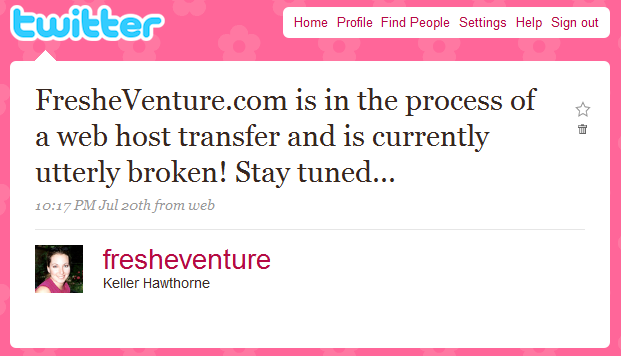
TMD contacted me letting me know the transfer of my site was complete. Meanwhile, my domain dns changes hadn’t taken effect yet, so I couldn’t see the results of my transfer. Finally, I reloaded my blog and saw that it in fact was now switched over – and utterly broken!
None of my posts were showing up, plugins were missing, my tabbed widget in my sidebar was gone and NO PAGES would load. The entire thing was a complete mess!
I quickly contacted TMD with the issues and, as usual, they responded promptly. After taking a look at my site, they let me know they would need some time to figure out the issues. FresheVenture.com would remain “under construction” for the rest of the day…
Oops, I Forgot I Had That on My Server
Tuesday morning I awoke to find a website titled “Thread and Wire” now in FresheVenture.com’s place. See, before I even began thinking about developing my Internet business blog, I began work on a jewelry resource website that I wanted to call ThreadandWire.com. I created the home page design and uploaded it to my server as an index.html file. About a month later, I decided to focus my attention onto a new project – FresheVenture.com!
Unfortunately, I forgot to remove the index.html file. It wasn’t a problem before this transfer because WordPress overrides the index.html file. But, when my blog broke, TMD removed WordPress to do a new install and Thread and Wire appeared!
Now not only was my blog broken, but a new and COMPLETELY unrelated website appeared in its place! I could only imagine how many visitors I was confusing…
WordPress Upgraded – Plugins Not Happy
After investigating, TMD Hosting discovered the following issues:
- My database was corrupted during the export process.
- Some plugins were generating errors like:
TMD got to work on doing a fresh install of WordPress and a new export of my old database. About 5 hours later, the transfer was complete. I went to do a review of my site and discovered that my posts and pages were back up, BUT I was still missing my sidebar widgets and plugins.
It seems, TMD decided to install WordPress 2.8 rather than the version I was using, 2.7. This obviously caused issues with plugins and it replaced my formatting.php file. This meant, my picture thumbnails no longer appeared in my excerpts and my excerpt lengths had changed. UGH!!!
I went ahead and logged into my WP admin so that I could quickly add a new post before something else happened. There, I discovered another issue – anytime I saved a post, previewed a post or managed any plugins, I would get a BLANK WHITE SCREEN!
I decided to get some sleep…
I’ll Just Do It Myself!
Wednesday morning, I awoke to find that I was COMPLETELY LOCKED OUT of my wp-admin! After a few more support tickets with TMD, I decided to take matters into my own hands and try to fix the darn thing myself.
Rather than starting with a transfer of my files, I decided to download and do a fresh install of WordPress 2.7 on my new server. If it worked, I would know there was something wrong with MY files and not my server.
It worked! There it was – the default Kubrick theme on FresheVenture.com. Now to get my info into it…
I transferred my database files and all of my posts and pages appeared! Everything worked perfectly. So, I went ahead and transferred in my theme. Again, everything worked great! So, what the heck was the issue?
My last step was to transfer my original formatting.php file. I had modified this file in order to customize the appearance of my excerpts. So, I uploaded it and…
BOOM! CRASH! POP!
My wp-admin was no longer accessible! So, I had found the rotten file, but I had no clue why it worked fine on my old server, but not on my new one.
The Infamous WordPress Blank White Screen
After doing some research online, I discovered my issue wasn’t uncommon. The white screen of death, as many have called it, has to do with extra white space inserted at the end of your php files.
See, the formatting.php file is supposed to end with ?>. However, my original file somehow acquired a blank paragraph (or white space) after the ?> through the transfer. This causes HUGE ISSUES with WordPress. Any special password pages, preview pages, or save pages would turn up white screens. This meant my free report, Fresh Start for Your Online Business, was no longer available to my newsletter subscribers!
If I was able to alter this file before, I should be able to do it again right? Unfortunately, I wasn’t able to make my customizations this time without causing issues. So, I decided to install an excerpt plugin to do the work for me and left the formatting.php file alone. I plan to investigate this issue further.
Pages and Posts Not Found – 404 Permalinks
Once my transfer was complete, I could see all of my categories, pages and posts on my home page, but when I tried to click through to them, I would get a 404 error. After a really quick search on Google, I discovered a big DUH! on my end…
I forgot to update my permalinks!
After a transfer, I guess it’s required that you log into your wp-admin, go to settings > permalinks, and click “Update.” This solved all of the 404 errors and my pages/posts were loading faster than ever on my new server!
Comments Not Syncing – Internal Server Error with Disqus
I could have made this transfer sooooo much easier on myself by adding a special “under construction” page to my blog, but I didn’t want to miss traffic or comments. So, I kept FresheVenture.com live during this entire process and continued to get comments. Unfortunately, these comments were not synced properly with my Disqus commenting system.
Here’s a little diagram of the issue:
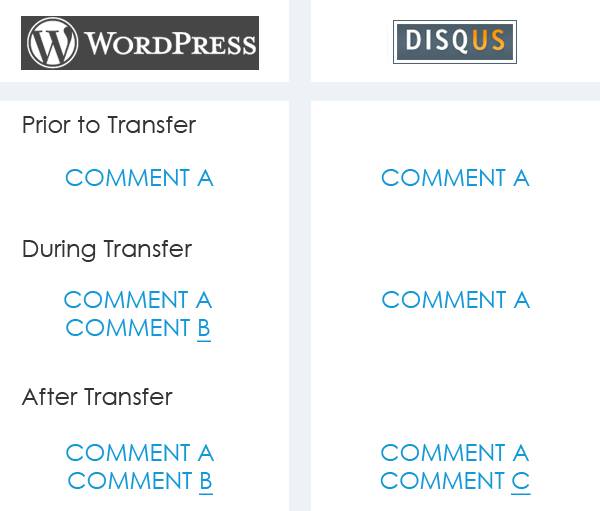
After reinstalling Disqus about 10 times, I decided to delete one comment that was in Disqus, but never made it into my WordPress database. Here are the steps I took:
- Removed “Comment C” from Disqus
- Inserted “Comment C” into WordPress Manually
- Re-Synced Disqus and WordPress
Basically, the problem seemed to be that Disqus thought it was fully synced with my WordPress because it had a comment that my WordPress didn’t have. So, it didn’t think it was missing anything. However, it had actually missed a couple comments during my transfer. After taking the steps above, my comments were once again fully synced!
Last Issue: Email
Any time you update/modify your domain’s name servers, you have to remember to update your email. So, I set up my email on my new server and voila – everything worked!
Final Results
Half the Loading Time!
My new server is awesome and pages and posts are loading in only half the time as they did on Network Solutions!
Dedicated IP Address!
I also purchased a dedicated IP address and after using Axandra’s free Reverse IP Lookup tool, I can see that sure enough it’s only me and NOT me and 791 other websites!
No More Server Issues!
Akismet and all of my other plugins are working perfectly!
Great Customer Service!
Even though TMD Hosting was unable to discover the issues with my transfer, they never left me hanging by always responding quickly to my inquiries and investigating the issues. I would like to thank the following TMD staff members:
- Gabriel Reed
- Stanley Cooper
- George Moody
- Leroy Clark
I Need Your Feedback!
Please let me know if you catch any issues/errors on FresheVenture.com. After all of the changes/uploads/downloads/reloads/yada yada, I don’t want to miss anything. If you can’t see an image, have trouble loading a page, see something out of alignment or anything else, please let me know!
Tips for WordPress Transfers
- BACKUP EVERYTHING!!!
- Check for White Space in Your PHP Files
- Try Not to Add New Posts or Allow Comments During Your Transfer
So, there you have it – my story of woe for the week. I’m SO GLAD it’s over!!! If you have any questions about this post or the transfer process, let me know!
Have You Had Issues Transferring Your Website to a New Host? What Tips Can You Share with the Rest of Us?


Topic Tags:
dedicated ip address, network solutions, shared hosting, tmd hosting, web server, wordpress, wordpress transfer
 I’m Keller Hawthorne, Founder of FresheVenture.com. Whether you’re new to the world of Internet Marketing or already have your own Internet Business, I’m here to help you make a living online!
 Subscribe to My RSS Feed!